
Last updated on
Nov 6, 2026
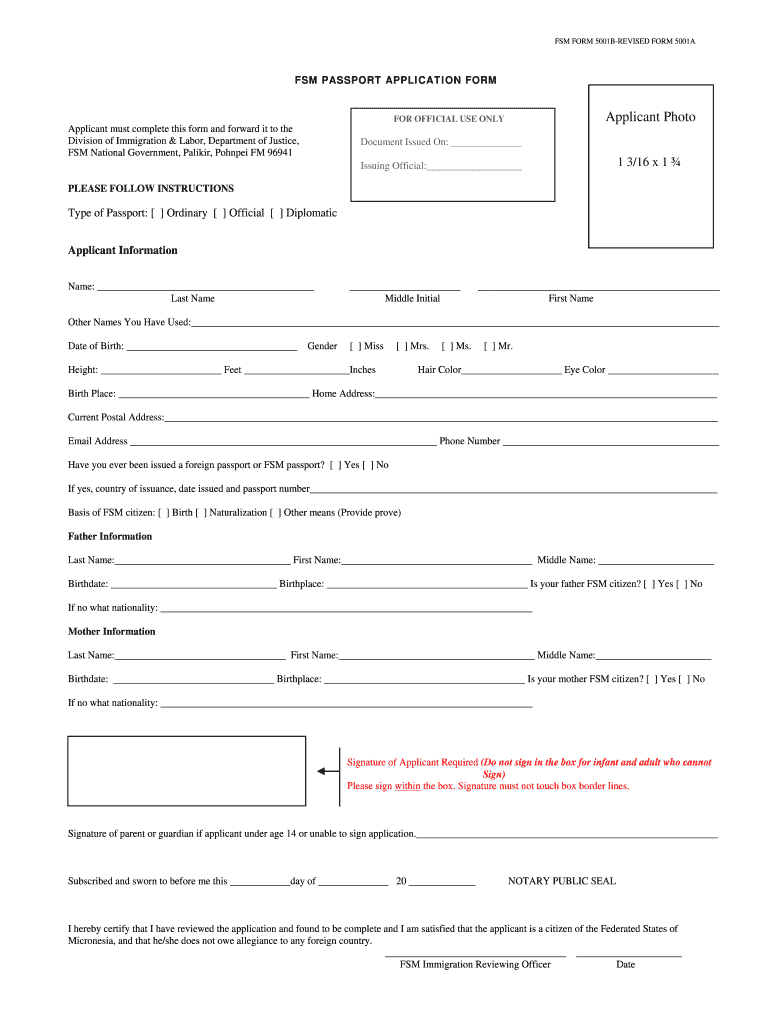
FSM 5001-B free printable template
pdfFiller is not affiliated with any government organization

Fill out
Complete the form online in a simple drag-and-drop editor.

eSign
Add your legally binding signature or send the form for signing.

Share
Share the form via a link, letting anyone fill it out from any device.

Export
Download, print, email, or move the form to your cloud storage.
Why pdfFiller is the best tool for your documents and forms


End-to-end document management
From editing and signing to collaboration and tracking, pdfFiller has everything you need to get your documents done quickly and efficiently.
Accessible from anywhere
pdfFiller is fully cloud-based. This means you can edit, sign, and share documents from anywhere using your computer, smartphone, or tablet.
Secure and compliant
pdfFiller lets you securely manage documents following global laws like ESIGN, CCPA, and GDPR. It's also HIPAA and SOC 2 compliant.
What is FSM 5001-B
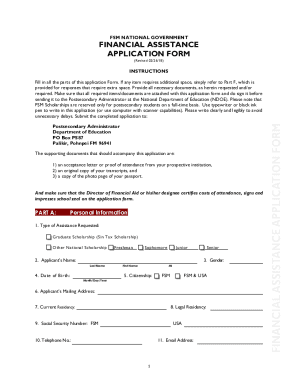
The FSM Passport Application Form is a Government Form used by individuals to apply for a passport from the Federated States of Micronesia.
pdfFiller scores top ratings on review platforms




Works quite well. It would be nice if it was possible to copy/paste an entire page rather than just one field/block. Otherwise, very handy.
It makes our business so much easier to run. Our insured love not having to fill things out by hand (so do we!).
Great program. Easy to use and priced fairly. Keep up the great work!
A nice and easy software that make PDFs more enjoyable
I love this app just wish when using the Text Feature, when filling in a form with white space, that you could move the text box if it is not aligned .
very easy to fill and amazing you have every single form
Who needs FSM 5001-B?
Explore how professionals across industries use pdfFiller.

FSM 5001-B is needed by:
-
Individuals applying for a passport in Micronesia
-
Parents or guardians submitting on behalf of minors
-
FSM Immigration Reviewing Officers processing applications
-
Residents of the Federated States of Micronesia
-
Travelers planning to visit foreign countries
-
Legal representatives assisting with applications
Comprehensive Guide to FSM 5001-B
What is the FSM Passport Application Form?
The FSM Passport Application Form is a crucial document for individuals seeking to obtain a passport from the Federated States of Micronesia. This form plays a significant role in the application process, as it requires detailed personal information and proof of citizenship. Completing the FSM passport application form accurately is essential, as it ensures that the application is processed smoothly and submitted to the appropriate authority—the Division of Immigration & Labor.
Failure to fill out this form correctly may lead to delays or rejections, emphasizing the importance of attention to detail and proper submission protocols.
Purpose and Benefits of the FSM Passport Application Form
The FSM Passport Application Form serves as a vital gateway for individuals needing valid travel identification. Having a passport not only facilitates international travel but also fulfills legal identification requirements. Using this form can offer several advantages, including streamlined submission through platforms like pdfFiller, which simplifies the process for applicants.
With an easier submission process, applicants can avoid common pitfalls that lead to incomplete applications and ensure timely processing of their passports.
Who Needs the FSM Passport Application Form?
Various individuals may need to fill out the FSM Passport Application Form. This includes U.S. citizens who are traveling to or from Micronesia, as well as Micronesian citizens applying for their passports. For applicants who are minors, specific requirements include having a parent or guardian co-sign the form, ensuring that appropriate consent is secured.
Understanding who needs this form allows individuals to prepare adequately, ensuring compliance with all requirements prior to submission.
Key Features of the FSM Passport Application Form
The FSM Passport Application Form is designed with user-friendliness in mind, featuring fillable fields and checkboxes for essential information. Key characteristics include:
-
Multiple fields for personal information, such as name and date of birth.
-
Notarization requirements to validate the authenticity of the application.
-
Clear instructions for proof of citizenship submissions.
-
Payment submission options for processing the application fee.
These features aim to make the application process as seamless as possible for applicants, ensuring all necessary information is captured efficiently.
How to Fill Out the FSM Passport Application Form Online (Step-by-Step)
Completing the FSM Passport Application Form online can be straightforward with the right guidance. Follow these steps to ensure your application is correctly filled out:
-
Access the FSM Passport Application Form on pdfFiller.
-
Carefully enter your personal information in the designated fields.
-
Check all required boxes, and make sure to notarize the document.
-
Ensure that all mandatory fields are complete before submission.
By following these steps, applicants can minimize errors and ensure their application meets all necessary requirements.
Required Documents and Supporting Materials
To support your FSM Passport Application, you must prepare several essential documents, including:
-
Your birth certificate to establish identity.
-
A recent passport photo that meets specified criteria.
-
Proof of citizenship as stipulated by the FSM.
-
Add any additional required forms as indicated in the application instructions.
Ensuring all necessary documents are included with your application helps facilitate a smoother processing experience.
Submission Methods and Delivery
Submitting the FSM Passport Application Form can be done through various methods. These options may include:
-
Mailing the application to the Division of Immigration & Labor.
-
In-person submission at designated government offices.
It's crucial to know the authority responsible for processing your application to avoid any mishaps during delivery.
Fees, Deadlines, and Processing Time
Understanding the financial aspects and timelines of the application process is vital. The fees associated with the FSM Passport Application Form can vary based on the type of passport requested. Payment methods are typically outlined in the form instructions. Additionally, applicants should be aware of:
-
Expected processing times which may differ depending on the volume of applications.
-
Deadlines that can affect the speed of obtaining your passport.
Filing during designated periods is essential to ensure timely processing of your passport application.
Tracking Your Submission and What Happens After You Submit
After submitting your FSM Passport Application Form, applicants can track the status of their application. To do this:
-
Visit the specified tracking platform or contact the Division of Immigration & Labor.
-
Stay informed about next steps, such as when to expect processing notifications.
Being proactive about tracking your application can provide peace of mind during the waiting period.
Securely Fill Out Your FSM Passport Application Form with pdfFiller
Utilizing pdfFiller for your FSM Passport Application ensures a secure and efficient form-filling experience. This platform provides several benefits, notably:
-
Advanced security measures to protect your personal information, including 256-bit encryption.
-
A user-friendly interface that simplifies the document management process.
Choosing pdfFiller gives applicants the confidence that their sensitive documents are handled with care, making the application process as smooth as possible.
How to fill out the FSM 5001-B
-
1.To access the FSM Passport Application Form, visit the pdfFiller website and search for the form by its name or category.
-
2.Open the form by clicking on the provided link, which will launch it in the pdfFiller workspace.
-
3.Before completing the form, gather all necessary information, including personal details, proof of citizenship, and supporting documents like a birth certificate and passport photos.
-
4.Use the toolbar on the left to navigate through the various fields. Click on each blank field to enter your information clearly.
-
5.For checkboxes, simply click on the box to mark your selection. Follow any explicit instructions provided on the form for each section.
-
6.Review your completed form closely, ensuring all fields are filled correctly and that you have notarized the necessary signatures.
-
7.Once you are satisfied with your form, save your progress by clicking the 'Save' button. To download it, select the 'Download' option in the top menu.
-
8.Finally, submit the completed application electronically if that option is available, or print it out to mail or deliver to the Division of Immigration & Labor.

Who is eligible to apply for a passport using this form?
Any citizen of the Federated States of Micronesia can apply for a passport using the FSM Passport Application Form. This includes children, who require a parent or guardian to submit the form on their behalf.
What documents are needed when submitting this application?
You need to include proof of citizenship, such as a birth certificate, along with passport photos and payment for the application fee. Ensure all documents are current and properly notarized.
How do I submit the FSM Passport Application Form?
You can submit the FSM Passport Application Form either electronically via pdfFiller if accepted or by printing and mailing it to the Division of Immigration & Labor, Department of Justice, FSM National Government.
Are there any deadlines for submitting this application?
While there are generally no strict deadlines, it is encouraged to submit your application as early as possible to avoid delays, especially if you have upcoming travel plans.
What are common mistakes to avoid when filling out this form?
Common mistakes include leaving fields blank, submitting unsigned forms, and failing to include required supporting documents. Double-check each entry and ensure all required documentations are attached.
How long does processing take once I submit my application?
Processing times for the FSM Passport Application can vary, but it typically takes several weeks. It is advisable to check with the immigration office for more specific timelines.
Is notarization necessary for this form?
Yes, notarization is required for the FSM Passport Application Form to validate the signatures of the applicant and any parent or guardian. Make sure this is completed before submission.
Related Content
Related Forms


Related Catalogs
Get the latest insights from our blog


If you believe that this page should be taken down, please follow our DMCA take down process
here
.
This form may include fields for payment information. Data entered in these fields is not covered by PCI DSS compliance.